
RustMinerSystem

Custom iOS Widget

Paid custom editions of RustMinerSystem can use this Scriptable-based iOS widget to check online devices, pending reviews, client count, coin device totals, hashrate, and trends directly from the iPhone home screen.
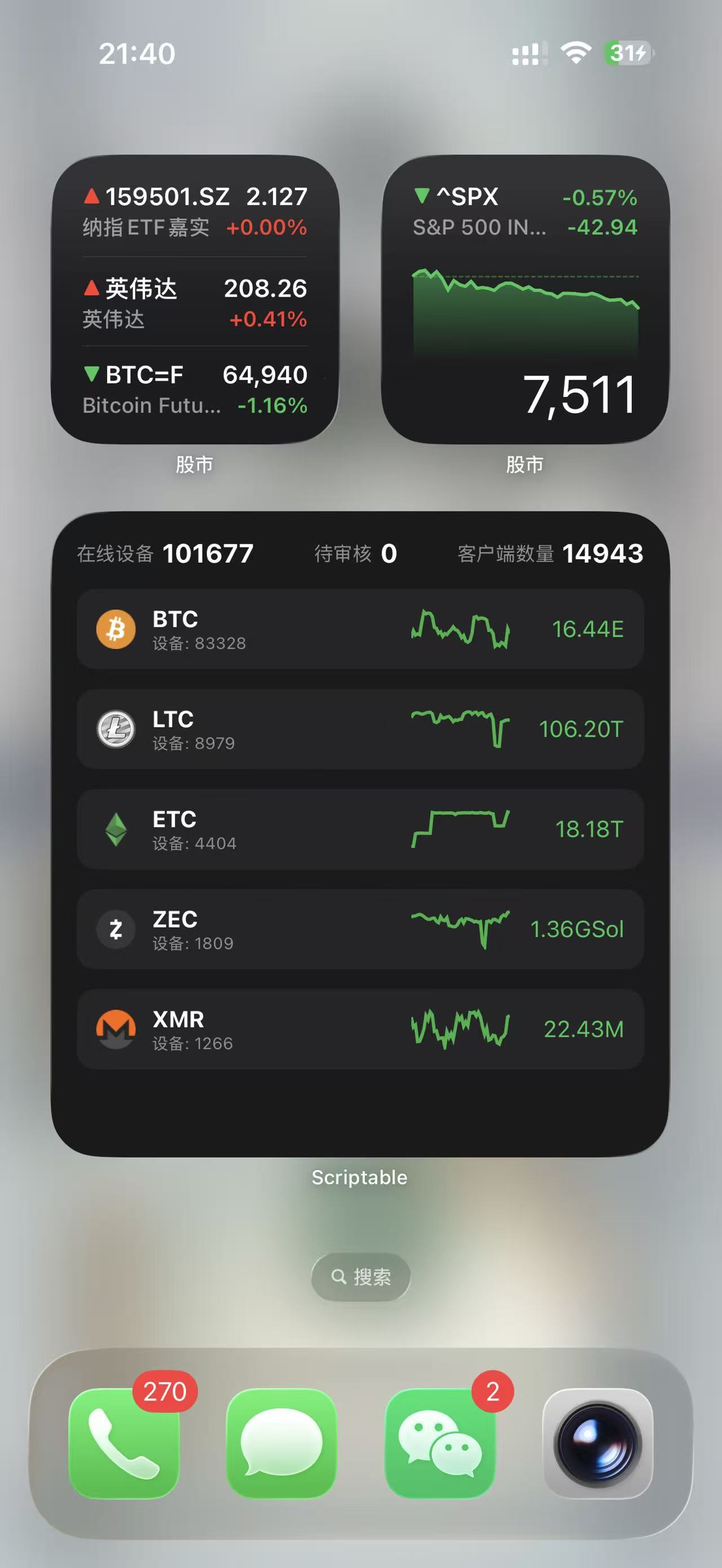
Scriptable widget
Personalized script generator

Enter CID, account, and password to run first-step login

The new download flow will use the customer CID plus the administrator-issued account and password to get a CTL Token, then write it into the Scriptable script. For now, it runs the first-step login and prints the first response to the console.

First-step login check

Enter the customer CID plus the account and password issued by the administrator. This currently runs the same login flow as the management console and returns the first-step data; the second token request will be connected later.

Complete human verification first.

This currently runs only the first-step login and does not download a script. Enter credentials on a trusted device.

Personalized script generator

What the widget shows

The script calls the custom management API and compresses the most useful data into an iOS widget layout.

Key totals

The top row shows online devices, pending reviews, and client count.

Coin list

The widget shows the top 5 coins by device count with devices, hashrate, and mini trend lines.

Auto refresh

The script schedules a refresh after 15 minutes, which works well for quick home-screen checks.

Personalized script generator

Setup flow

This stage only completes the first-step login check. Once the full flow is connected, the customer can import the script into Scriptable and bind it to an iOS home-screen widget.

01

Install Scriptable

Search for Scriptable in the iPhone App Store, install it, and allow network access on first launch.

02

Enter authorization details

The customer enters the CID plus the account and password issued by the administrator, then the page sends the first-step login through a Cloudflare Function.

03

Download the custom script

After the second token request is connected, download the JavaScript file with the token already inserted.

04

Import into Scriptable

Send the JS file to the iPhone and choose Scriptable from the share menu, or create a new Scriptable script and paste the file contents.

05

Add the home-screen widget

Long-press the iPhone home screen, tap plus, choose a large Scriptable widget, then edit the widget and select the imported script.

Ecosystem support

Infrastructure for downloads and deployment

RustMinerSystem works with cloud services, network infrastructure, and code hosting platforms to support reliable downloads, deployments, and global access.